
There are lots of ways on how to integrate technology in Teaching English as a foregin language classroom. Here are several plans on using several tools for our teaching :
We all know that learning with mindmapping has a lot of benefits for instance, we can show people about the ideas/concepts in our mind and they will easily understand because mind map is very clear and well-constructed. Moreover, mindmap are really fun and enable a free flow of ideas because it only uses symbols or phrase so that people can write a lot of ideas there. Rather than reading monotonous writing in a book particularly the thick one, people will prefer to create mindmap because it will make them easier to remember information.
Mindmap is really fruitful for all students in the whole world not only for those who learn maths, science, geography, but also languages. This time, I want to show the benefit of mindmap in helping students memorise several tenses. We can use coggle or any mindmapping tools to create a mindmap. Below is the example of the mindmap :
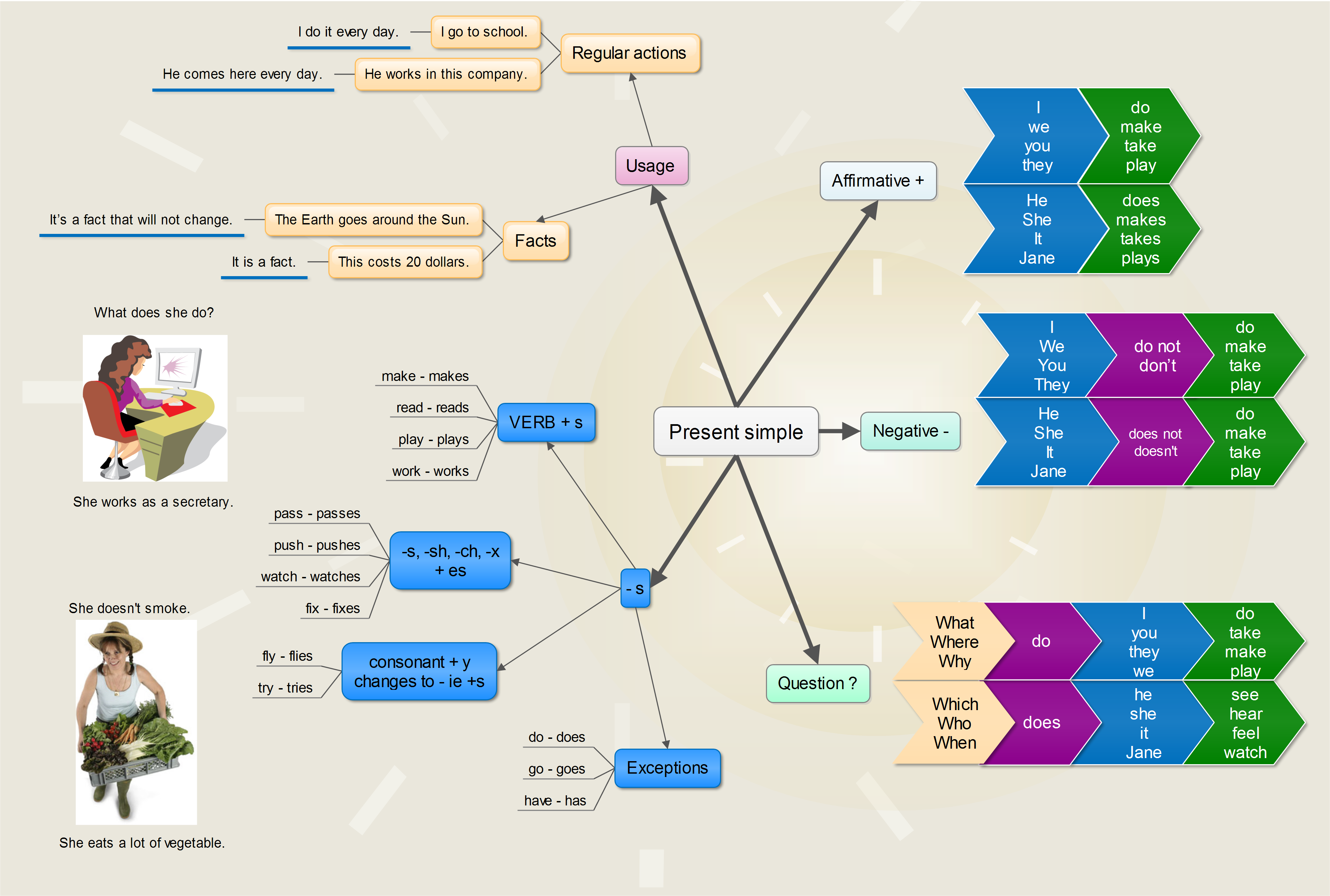
How do we do that? What are the steps? Easy. We can just simply show our students about the example of a mindmap that is desired to create, and we can also tell them the advantages of using mindmap to understand and memorise the tenses easily. After that, we can ask them to design their own mindmap. We may choose one or two tenses for each meetings. (because if we have more than 2 topics it will be too difficult for the students).
Have you ever heard about kahoot before? or do you feel familiar with that name? or even your teachers have tried to invite you playing with kahoot several times? Yupss, kahoot is a tool that can be used by educators to create a mini game or mini quiz for the pupils. In kahoot, we can play the guessing games or something like multiple choice.


How do we use this tool? Certainly it isn’t hard, you may check this video how to use kahoot for teaching and see the tutorial on how to use kahoot to make the teaching learning atmosphere becomes really fun.
- 3. Teaching English using social media (twitter, facebook, email,etc.)
Nowadays, social media becomes a half part of humans’ soul. Some people may accidentally feel that they can’t live without social media. When they wake up, they check their social media, when they are at work they use social media, and even when they want to go sleep they check the social media again and again. Yupss, there are advantages and disadvantages ofusing social media. But, in this ocassion I want to talk about the advantages of social media specifically in EFL classroom. You may check this link (using social media in the classroom) to know the further information on how to use social media for teaching.

- 4. Teaching English using Videos (Youtube/any editing software)
We all know that the role of videos as a media for teaching/learning process becomes really essential. Videos can support us to provides teaching materials inside of it. Furthermore, video can really beneficial to teach any lesson not only English, depends on what kind of video is it. But this time, I will outline the plans of using videos in EFL classroom.

Using videos such as description videos, or explanation videos or even animation videos for our teaching isn’t difficult to be applied. Firstly we just need to find appropriate videos for our students, display it on the LCD, and then finally we may ask them to write the conclusion or what can they learn from that video. Another plan that we can use is, we can just simply display videos particularly explanation videos that can explain students about the todays’ lesson or what thing you are going to show them. What videos should i use? Massive numbers of education videos available on youtube, you can just type what you are looking for and find it. Yet, if you’re still confused to consider which videos should you use then you may create your own videos by using animaker or PowToon.
- 5. Teaching English using Timeline
Timeline can be an effective tool for EFL teacher to teach certain lesson such as Recount text, Narrative Text or even Telling Time. This time, I want to show the steps on how can we use timeline for teaching Recount text.
As we know, recount text is a genre of text which has purpose to retell a story happened in the past. By using Timeline, we can show our students what were happening on the story. For instance, “at Summer 09 (create an event as an orientation at June 2009), Richards woke up late and realised that he was left by his family.” After that we can add other events as the body or the events part in recount text, such as “Richards had no idea why was he left, but he could clearly remember what happened last night”. Then, we can ad more and more events till the story ends. Finally, we cancan display it on the LCD so the students can see it.
You can use this tool Preceden

to create a timeline
Bonus :
Lesson plan 1 A full plan that was made by me and my group.